


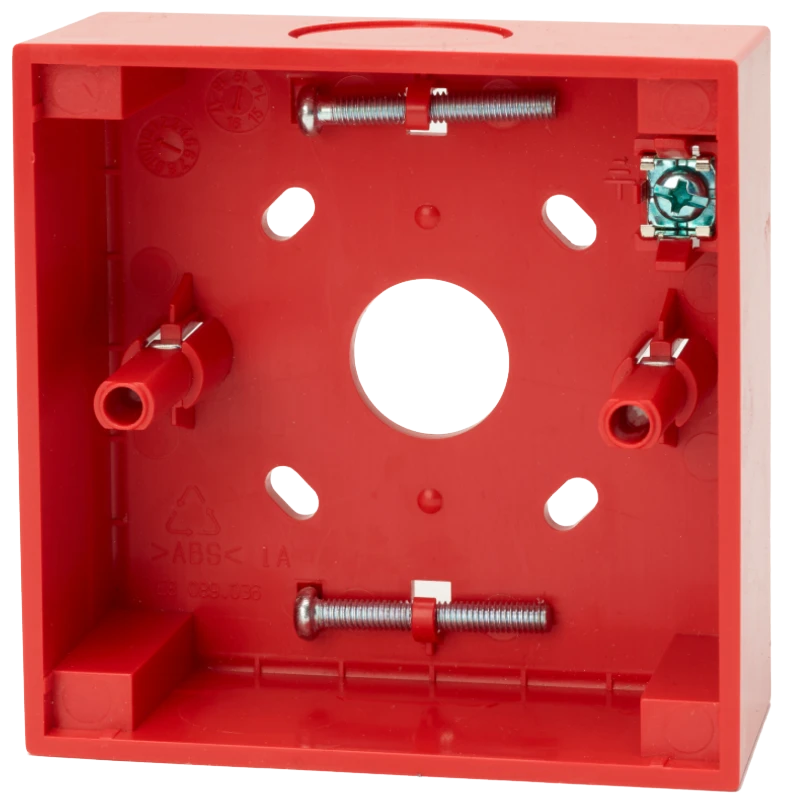

Ziton N-MC-BB-R Intelligent Manual Call Point Surface Mount Back Box | Adjustable Mounting, Screen Terminal
£2.79 (inc VAT: £3.35)
Key features
- Rear and three-side cable entry in one unit
- Rotates 180° to relocate cable entry point
- Adjustable mounting holes correct for uneven drilling
Downloads
Summary
The N-MC-BB-R is a surface mount back box built for DM3000, KAL750 and ZP780 series manual call points (MCPs), and its standout feature is the combined rear and side cable entry on a single unit. That means you’re not choosing a different box depending on whether the job uses hidden trunking or surface conduit; one back box covers both.
View full overview Show less
On site, this flexibility saves you carrying multiple SKUs and reduces the chance of specifying the wrong box for a given cable route. If the first-fix trunking ends up slightly off level, the adjustable screw mounting holes let you correct the alignment before the MCP goes on, rather than re-drilling.
Device alignment guides then line the back box up with the MCP front so the finished installation looks like a single moulded unit rather than two mismatched parts. A screen connection terminal is built in for sites with electrical noise, so you’re not improvising a separate screen termination.
Features
- Rear and side cable entry - one back box handles hidden trunking from behind or surface trunking via top and bottom knockouts
- 180° rotation - reposition the entry point at the top or bottom to suit the run on site
- Adjustable mounting holes - compensates for holes that aren’t perfectly level, so the box still sits square
- Device alignment guides - keeps the back box and MCP front in register for a clean, single-unit appearance on the wall
- Screen connection terminal - one terminal provided for cable screening in electrically noisy installations
- Fixing screws included - MCP mounting screws are housed in the base, so there’s nothing extra to source
- Compliant construction - self-extinguishing Noryl SE100 body meeting REACH, RoHS 2 and WEEE requirements
Specifications
| Compatibility | Aritech, Kilsen, Ziton manual call points (DM3000, KAL750, ZP780, NC-MC series) |
|---|---|
| Terminals | 1 (cable screen) |
| Physical Dimensions | 87.1 x 87.1 x 35 mm (W x H x D) |
| Net Weight | 60 g |
| Colour | Red (RAL 3028) |
| Mounting Type | Wall mount |
| Cable Entries | 3 side, 1 rear |
| Material (Body) | Noryl SE100 (self-extinguishing) |
| Vandal Proof | No |
| Operating Temperature | -25°C to +72°C |
| Storage Temperature | -25°C to +72°C |
| Relative Humidity | 10 to 95% noncondensing |
| Environment | Indoor |
| Approvals | REACH, RoHS 2, WEEE |
FAQ
It’s designed for Aritech, Kilsen and Ziton manual call points, specifically the DM3000, KAL750 and ZP780 addressable series, and it also aligns with the NC-MC series conventional MCPs. Check your MCP model against this list before ordering to confirm a matching front plate fit. Yes. The box has dust proof knockouts at the top and bottom for surface mount trunking, as well as a large rear opening for hidden cable runs. You pick whichever entry point suits the job, and the box can be rotated 180° to put that entry at the top or bottom. The mounting holes are adjustable, so you can correct minor misalignment when fitting the box to the wall rather than re-drilling. This is particularly useful on retrofit jobs where existing holes or wall boxes aren’t perfectly positioned. No, suitable screws for fitting the compatible MCP to the back box are supplied and housed in the base of the box, ready to use on install. No, the N-MC-BB-R is rated for indoor use only, with an operating temperature range of -25°C to +72°C. For an outdoor or harsher environment you’d need to check the manufacturer’s range for a suitably rated alternative. It’s provided for use where the installation is in an electrically noisy environment and cable screening is needed. If your site doesn’t have that issue, the terminal simply isn’t used.Which manual call points fit the N-MC-BB-R?
Can I use this with surface trunking instead of chasing cable into the wall?
What if my drilled fixing holes aren't quite level?
Do I need to source my own screws to fit the MCP?
Is this suitable for outdoor installations?
Is the screen terminal required for every installation?
Downloads
- Datasheet (Adobe PDF)
Additional information
| Weight | 0.6 kg |
|---|