Updated 6 November 2026: Reviewed against Advanced’s current UK and Ireland MxPro 5 brochure, model ordering information, ConfigTool and firmware release notes. This guide compares the panel families Huvo sells and explains what to check for a new system or upgrade.
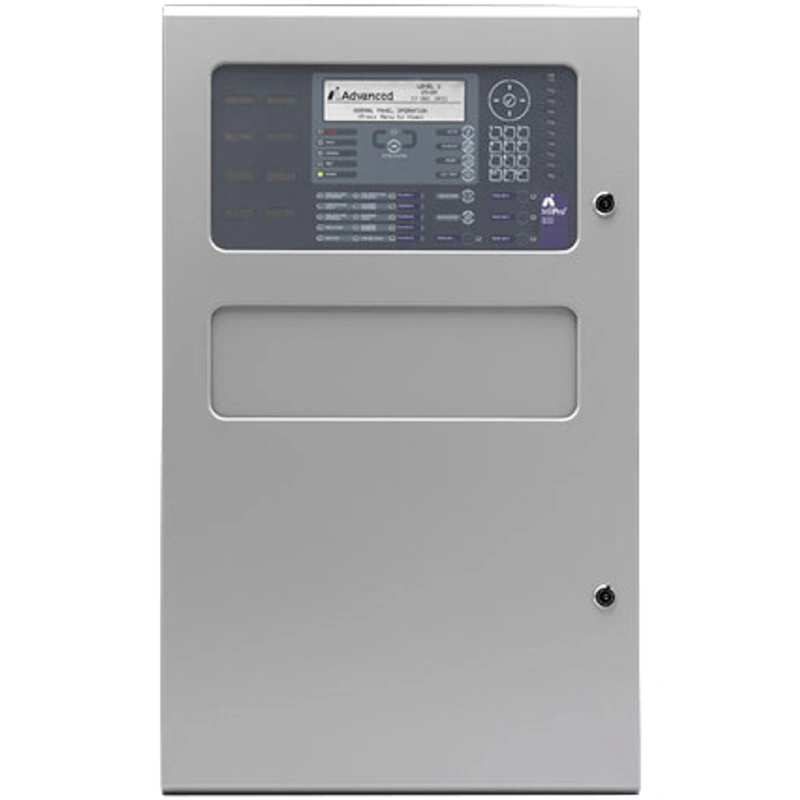
The Advanced MxPro 5 is an addressable fire alarm panel range with fixed one-loop and expandable two-, four- and eight-loop families. Choosing the right panel means checking the loops fitted, maximum capacity, device protocol, enclosure and network requirements—not just the number in a product listing title.
This article originally covered the next-generation launch in 2024. It now includes a practical model comparison, buying checklist and FAQs, with product selectors for the current Huvo listings.
Advanced MxPro 5 models: one, two, four or eight loops?
A detection loop connects compatible addressable devices to the panel. The number of loops fitted when ordered can be lower than the panel family’s maximum. Future expansion also requires suitable additional loop hardware and a checked system design.
The examples below use Apollo/Hochiki versions from Advanced’s MxPro 5 UK and Ireland brochure, alongside Huvo’s current selectors. Protocol and enclosure suffixes change the full order code.
| Panel family | Example order code | Loops fitted in that example | Family loop capacity | Enclosure / selection detail |
|---|---|---|---|---|
| Fixed one-loop | MX-5101 | 1 | 1 | Small enclosure; the Huvo listing also offers medium, large and deep variants. |
| Expandable one-to-two-loop | MX-5201 / MX-5202 | 1 / 2 respectively | Up to 2 | Medium enclosure examples; select loops and enclosure separately. Large and deep options are also listed. |
| Expandable one-to-four-loop | MX-5401 | 1 | Up to 4 | Large enclosure example. Huvo offers one to four fitted loops and large, deep or extended enclosures. |
| Expandable two-to-eight-loop | MX-5802 / MX-5802/FT | 2 | Up to 8 | Extended enclosure; standard or fault-tolerant network version. Select the fitted loop count required. |
A “2 Loop” or “8 Loop” listing title does not mean every option arrives with that many loops fitted. Check the selected configuration and resulting SKU. The fixed MX-5101 family is different from an expandable MX-5201 supplied with one loop.
Fixed one-loop panel: MX-5101 family
Consider the fixed one-loop family where the system design needs one loop and does not require a second loop within that panel. Select the specified device compatibility and enclosure; a larger box does not turn the fixed one-loop basecard into a two-loop model.

Expandable one-to-two-loop panel: MX-5200 family
The MX-5201 medium Apollo/Hochiki example has one loop fitted; MX-5202 has two. If you need two loops on delivery, choose 2 under Loops in the selector. If you are planning later expansion, confirm the compatible additional loop card and the power, battery and loop calculations first.

Expandable one-to-four-loop panel: MX-5400 family
This family provides expansion to four loops. Advanced lists MX-5401 as the large-enclosure Apollo/Hochiki model with one loop card fitted. Huvo’s selector also lets you choose more fitted loops and alternative enclosures, so specify the complete configuration rather than assuming the base example includes four cards.

Expandable two-to-eight-loop panel: MX-5800 family
Advanced’s MX-5802 example has two loop cards fitted in an extended enclosure. The /FT example identifies the fault-tolerant network version. Huvo offers a fitted-loop selector from two to eight, plus a separate network-type choice.
Choose the network arrangement specified for the site. The panel’s maximum loop capacity and the network’s node capacity describe different things; neither replaces the device, load and system-design calculations.
What changed in the next-generation MxPro 5?
Advanced’s next-generation launch information and current brochure describe an updated processor, more configuration capacity, a revised power supply arrangement and easier AdvancedLive connection in the UK and Ireland.
Processor and configuration improvements
Advanced describes the next-generation processor as offering eight times the processing power of the previous model. Its brochure also describes increased memory and programming capacity. These are manufacturer comparisons between generations, not a promise that every project or individual operation will be eight times faster.
The practical benefit for a specification is the available configuration capability and the suitability of the complete panel for the site. Check the required points, cause-and-effect programming and current firmware before choosing replacement hardware.
Power supply and basecard changes
Advanced’s Gen 1/Gen 2 comparison shows the newer power supply separated from the basecard, intended to simplify replacement and integration with other equipment. It also describes a removable chassis arrangement for upgrading an existing panel.
That does not remove the need to check the actual power demand, batteries, standby requirements and enclosure space. A general “longer battery life” statement is not a battery calculation or a guaranteed standby duration.
| Area | Advanced’s described change | What to check on your project |
|---|---|---|
| Basecard and processor | Revised hardware, more processing and configuration capacity. | The installed and proposed hardware generation, required functions and firmware. |
| Power supply | Gen 2 uses an upgraded PSU separated from the basecard. | Supply rating, calculated loads, batteries and the approved replacement arrangement. |
| Configuration software | PC-NET-022 provides the newer ConfigTool platform; current release notes support Gen 1 and Gen 2. | The software/firmware pairing, existing configuration format and any conversion needed. |
| AdvancedLive connection | Gen 2 has onboard Ethernet connectivity in the UK and Ireland. | Panel generation, site network, service setup and permissions. Gen 1 requires additional hardware for connection. |
Apollo, Hochiki, Argus and Nittan compatibility
Advanced describes MxPro 5 as an open-protocol range with support for leading Apollo, Hochiki, Argus and Nittan devices. Open protocol does not mean every addressable detector works with every selected panel or loop card. The installed devices, panel configuration and supported protocol must match.
Huvo’s selectors offer Apollo or Hochiki, Argus Vega and Nittan Evolution. Advanced’s parts list shows unsuffixed Apollo/Hochiki examples, V protocol variants for Argus and N variants for Nittan, with additional enclosure and networking suffixes where applicable.
For an existing system, record the actual device models and loop-card details. Confirm the exact devices and features against Advanced’s current compatibility information and release notes, including any firmware requirements. A manufacturer name alone is not a complete compatibility check.
Wireless or hybrid operation also depends on the selected protocol and compatible translator/expander equipment. Do not assume a wireless device can join a panel directly, or that different protocols can be mixed merely because they appear on the same product page.
ConfigTool PC-NET-022, firmware and older files
Advanced’s ConfigTool release notes confirm that version 12.00 added support for both MxPro 5 Gen 1 and Gen 2 panels. They also confirm import of PC-NET-003 configuration files from version 7.00 onwards into PC-NET-022.
That is useful for an upgrade, but importing a file does not establish that every device, output, delay and cause-and-effect setting is correct for the proposed hardware. Later release notes include changes to import and transfer behaviour. The commissioning engineer should use the appropriate current software and validate the transferred design.
Keep the MxPro 5 firmware release notes with that check. Do not choose a firmware file solely because it has the newest-looking number: it must be applicable to the actual panel hardware and intended configuration. This guide is for selection and planning, rather than a firmware-update procedure.
Can an older MxPro 5 be upgraded?
Advanced describes the next-generation panels as backward compatible with existing models and says the external appearance and familiar part numbers were retained. Its current brochure also describes replacing the Gen 1 basecard as an upgrade route.
The part number alone therefore does not prove the hardware generation. For a replacement or a project requiring Gen 2 features, ask for the supplied generation and complete configuration to be confirmed.
Before reusing equipment, have the competent system provider check the existing configuration, device protocols, loop cards, network interfaces, repeaters, power supplies and firmware. Agree the replacement method, any required conversion, commissioning tests and handover records. Backward compatibility is valuable, but it is not permission to swap equipment without checking the complete system.
For a networked site, include the actual remote terminals in the review. Our repeater-panel guide explains why display, control and network compatibility should be checked for the exact terminal.
AdvancedLive: check generation and service arrangements
Advanced’s AdvancedLive information identifies onboard Ethernet on next-generation MxPro 5 panels and scopes the service to the UK and Ireland. Its brochure says Gen 1 does not have that direct connection and needs additional hardware.
If remote monitoring is part of the project, confirm the panel’s generation, required hardware, suitable site network, account/service provision and authorised user functions. Buying a panel does not by itself establish a configured cloud service or an ARC/fire-service response arrangement. See AdvancedLive at Huvo and our fire-alarm monitoring guide for the distinction between monitoring, signalling and response.
MxPro 5 buying and upgrade checklist
- Identify the existing system: panel model, hardware generation, firmware, configuration backup and installed devices.
- Specify loops fitted and future capacity: fixed one-loop, expandable two-, four- or eight-loop family, with the required cards included.
- Match the protocol: exact detector/module models, loop cards and any wireless translators, with supported features confirmed.
- Choose the enclosure: correct size and mounting arrangement, allowing for batteries, cards, wiring and access.
- Check the network: standalone or networked, standard or fault-tolerant interfaces, existing nodes and remote terminals.
- Complete the design calculations: loop loading, cable arrangements, PSU demand and standby provision for the actual system.
- Agree software and service needs: compatible ConfigTool/firmware, configuration conversion, AdvancedLive hardware and service setup where required.
- Plan commissioning and records: tested cause and effect, faults, outputs, handover information and ongoing maintenance responsibilities.
MxPro 5 frequently asked questions
Is MxPro 5 available as a one-loop panel?
Yes. The MX-5101 family is the fixed one-loop option. The expandable MX-5200 family can also be supplied with one loop fitted, so check both the family and the selected configuration.
What is the difference between MX-5201 and MX-5202?
For the medium Apollo/Hochiki examples, MX-5201 has one loop fitted and MX-5202 has two. Both belong to the one-to-two-loop family. Protocol and enclosure choices can change the full code.
Does the four-loop panel arrive with four loop cards?
Check the configuration ordered. Advanced’s MX-5401 base example has one loop card, while Huvo’s listing lets you select one to four fitted loops. The family’s maximum is not the same as the fitted count.
Can every MxPro 5 expand to eight loops?
No. The maximum depends on the panel family. The MX-5101 is fixed at one; MX-5200 supports up to two, MX-5400 up to four and MX-5800 up to eight, with the appropriate hardware and system design.
Can I use any Apollo or Hochiki device?
Check the exact model and supported protocol/features with Advanced’s current documentation. Selecting a manufacturer family is not approval for every detector, module or sounder it produces.
Does PC-NET-022 support an older MxPro 5?
Advanced’s version 12.00 release notes confirm Gen 1 and Gen 2 support and import of PC-NET-003 files from version 7.00 onwards. Confirm the appropriate current software, firmware and any conversion, then validate the configuration during commissioning.
Does an MxPro 5 part number identify Gen 1 or Gen 2?
Not by itself: Advanced says familiar part numbers were retained across the next-generation update. Confirm the supplied hardware generation if your project relies on a particular feature or upgrade arrangement.
MxPro 5 and Axis EN are separate product ranges
The original launch covered both MxPro 5 and Axis EN. This buying guide focuses on the MxPro 5 listings above. Do not transfer an Axis EN device-capacity or compatibility statement to an MxPro 5 specification without checking the applicable product documentation.
For help selecting a panel, contact Huvo with the required fitted loops, device protocol, enclosure, network type and hardware-generation requirement. Refer to the Advanced MxPro 5 UK and Ireland brochure and current manufacturer documentation when preparing the specification.