
Ajax KeyPad TouchScreen Jeweller Wireless 5″ IPS Display, Smart Home Control
Key features
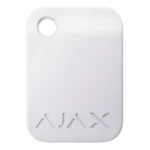
- Wireless touchscreen keypad with Pass, Tag, smartphone and code authentication
- Built-in buzzer for alarms, entry/exit delays and chime notifications
- Up to 1,700m communication range with encrypted Jeweller and Wings protocols
Downloads
Summary
The KeyPad TouchScreen Jeweller is a wireless security keypad featuring a 5-inch IPS touchscreen that provides intuitive control of Ajax security systems. Designed for indoor installation, this advanced keypad supports multiple authentication methods including Pass cards, Tag key fobs, smartphones via Bluetooth, and traditional access codes, offering flexible security management for homes and businesses.
View full overview Show less
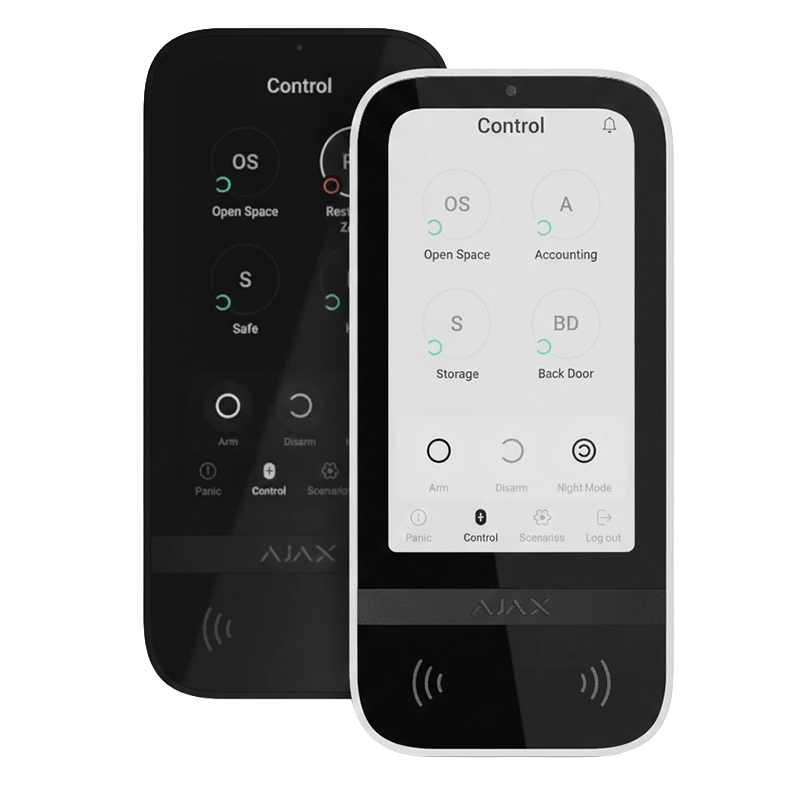
With its graphical interface, sound notifications, and LED indication, the KeyPad TouchScreen ensures clear communication between users and the security system. The device displays real-time system status, group security modes, and provides on-screen notifications when malfunctions are detected during integrity checks. Users can manage security groups, control automation devices, and respond to emergencies using three dedicated panic buttons.
Operating on both Jeweller and Wings wireless protocols, the keypad maintains secure, encrypted communication with the hub at distances up to 1,700 meters in open space. The device runs on six pre-installed AA batteries for up to 1.5 years, with optional external power supply support (10.5-14V) for extended functionality including always-active display mode and firmware updates.
Features
- 5-inch IPS capacitive touchscreen with automatic brightness adjustment and dark/light interface modes
- Multiple authentication methods: Pass cards, Tag key fobs, smartphones (Bluetooth), and access codes (4-6 digits)
- Support for up to 200 Pass/Tag devices depending on hub model
- Easy security group management with visual status indicators for armed, disarmed and Night Mode
- Control tab for automation devices with toggles showing current device states
- Scenarios management supporting up to six automation scenarios with pre-authorization option
- Three emergency buttons: panic, fire and auxiliary alert with accidental press protection
- Duress codes for silent alarm simulation whilst appearing to disarm the system
- Automatic keypad locking after three incorrect authentication attempts within one minute
- Fire alarm muting capability for interconnected fire detector systems
- Chime on opening feature to notify when doors are opened while system is disarmed
- Event acknowledgement displaying up to 100 latest system events grouped by date
- Jeweller protocol communication range up to 1,700m with data encryption and frequency hopping
- Wings protocol for firmware updates and additional system information transmission
- Built-in buzzer for alarms, security mode changes, entry/exit delays and door opening notifications
- Adjustable buzzer volume with quiet, loud and very loud settings
- LED indication for armed mode, battery status, alarms and tamper alerts
- Keypad activation when user approaches device during entry delays
- Pre-authorization feature to prevent unauthorized access to control panel
- Two-stage arming support with incomplete arming status indication
- Easy armed mode change allowing security switching without button confirmation
- System integrity check with on-screen malfunction notifications when arming
- DESFire technology for secure Pass/Tag authentication with 128-bit encryption
- Bluetooth Low Energy (BLE) support for smartphone authentication (version 4.2 or later)
- SmartBracket mounting panel for installation without disassembling device enclosure
- Tamper protection with alarm notification on dismantling attempts
- Battery life up to 1.5 years on six pre-installed AA batteries
- Optional external power supply support (10.5-14V, 0.5A minimum)
- Operating temperature range from -10°C to +40°C
- Compatible with Hub 2 (2G/4G), Hub 2 Plus and Hub Hybrid models running OS Malevich 2.16.1 or later
- Works with ReX 2 Jeweller range extender for extended coverage
- Over-the-air firmware updates via Wings protocol
- EN 50131 Grade 2, PD 6662:2017, INCERT and UL certified
Video
FAQ
What authentication methods does KeyPad TouchScreen support?
KeyPad TouchScreen supports four authentication methods: Pass cards, Tag key fobs, smartphones via Bluetooth (with Ajax Security System app installed), and traditional access codes. You can use keypad codes (general codes for the device), user codes (personal codes for registered users), keypad access codes (for unregistered users), and RRU codes (for rapid response units).
How long do the batteries last in KeyPad TouchScreen?
The device runs for up to 1.5 years on six pre-installed AA batteries, based on default settings and up to four daily interactions with the keypad. When external power is connected (10.5-14V), the pre-installed batteries serve as a backup power source. The system sends early warning notifications when battery replacement is needed.
What is the maximum communication range for KeyPad TouchScreen?
KeyPad TouchScreen can communicate with the hub or ReX 2 range extender at distances up to 1,700 meters (5,550 feet) in open space. The actual range depends on the installation environment, including walls, interfloor ceilings, and other obstacles. The recommended signal strength is 2-3 bars for stable operation.
Can I control automation devices with this keypad?
Yes, KeyPad TouchScreen includes a dedicated Scenarios tab where you can create up to six automation scenarios. You can control individual automation devices or create group scenarios to manage multiple switches, relays, or sockets simultaneously. The Control tab also displays toggles indicating the current state of automation devices when configured.
What happens if someone tries to guess my access code?
If an incorrect code is entered or an unverified access device is used three times within one minute, the keypad automatically locks for a pre-set time (ranging from 3 to 180 minutes, configurable in settings). During this lockout period, the hub ignores all codes and access devices, and sends notifications about the unauthorized access attempt to all system users and the security company.
Does KeyPad TouchScreen work with Group Mode?
Yes, KeyPad TouchScreen fully supports Group Mode, allowing you to control the security of individual groups separately. You can specify which groups are shared (visible) on the keypad in the Security Management settings. By default, all system groups are shared. The keypad display shows the security status of each group with visual indicators: white outline for armed groups, grey for disarmed groups.
Can I mute fire alarms from the keypad?
Yes, when the Mute Fire Alarm feature is enabled in settings, you can mute fire alarms (including interconnected fire detector alarms) directly from the keypad. However, if the fire alarm is triggered by ManualCallPoint Jeweller, or if CO or smoke levels are critical, the alarm cannot be muted from the keypad for safety reasons. This feature requires firmware version 11.60.10.19 or later.
How do I update the keypad firmware?
To update KeyPad TouchScreen firmware, you must connect an external power supply (10.5-14V, 0.5A minimum) to the device. Without external power, the update cannot proceed. Updates are initiated through the Ajax PRO or PRO Desktop apps when a new firmware version becomes available. The update process takes approximately 1-2 hours, or longer if operating via ReX 2 range extender.
What is a duress code and how does it work?
A duress code allows you to simulate system disarming in threatening situations whilst secretly alerting the security company and other system users. When you enter the duress code instead of your regular code, the keypad appears to disarm normally (Ajax app sirens won’t activate), but a silent alarm is sent to notify the monitoring station and users that you’re under duress.
Can I use my smartphone to control the system via KeyPad TouchScreen?
Yes, if Bluetooth authentication is enabled in the keypad settings and you have the Ajax Security System app installed on your smartphone (Android or iOS with BLE version 4.2 or later). Enable Bluetooth and Location services on your phone, ensure the Security management with a phone toggle is activated in the app, and present your unlocked smartphone to the keypad reader to authenticate and control security modes.
Specifications
- Product Name: KeyPad TouchScreen Jeweller
- Display Type: IPS capacitive touchscreen
- Display Size: 5 inches diagonal
- Display Resolution: 480 × 854 pixels
- Communication Protocols: Jeweller and Wings wireless protocols
- Communication Frequency Bands: 866.0–866.5 MHz, 868.0–868.6 MHz, 868.7–869.2 MHz, 905.0–926.5 MHz, 915.85–926.5 MHz, 921.0–922.0 MHz (depends on sales region)
- Communication Range: Up to 1,700m (5,550 ft) in open space
- Authentication Methods: Pass cards, Tag key fobs, smartphone (Bluetooth), access codes
- Contactless Access Support: Up to 200 cards and key fobs (depending on hub model)
- Bluetooth Support: Bluetooth Low Energy (BLE) version 4.2 or later
- Access Code Length: 4 to 6 digits
- Emergency Buttons: Panic, fire, auxiliary alert
- Power Supply: 6 × AA batteries (pre-installed)
- Battery Life: Up to 1.5 years
- Optional External Power: 10.5–14V⎓, up to 0.5A
- Operating Temperature Range: -10°C to +40°C (14°F to 104°F)
- Operating Humidity: Up to 75%
- Enclosure Colours: Black, white
- Dimensions: 171.5 × 82.1 × 26mm (6.75 × 3.23 × 1.02 inches)
- Weight: 327g (11.53 oz)
- Tamper Protection: Yes
- Certifications: EN 50131 (Grade 2), PD 6662:2017, INCERT, UL
- Compatible Hubs: Hub 2 (2G) Jeweller, Hub 2 (4G) Jeweller, Hub 2 Plus Jeweller, Hub Hybrid (2G), Hub Hybrid (4G), Hub BP Jeweller
- Compatible Range Extenders: ReX 2 Jeweller
- Required Hub OS Version: OS Malevich 2.16.1 or later
- Installation Type: Indoor use only
- Mounting: SmartBracket mounting panel included
Downloads
- Datasheet (Adobe PDF)
- User Manual (Adobe PDF)
More Keypad products from Ajax
Ajax KeyPad Jeweller | Wireless Touch Keypad | Arm & Disarm Control
Login or register to see prices
Ajax KeyPad Outdoor Jeweller | Wireless Outdoor Keypad | Card/Tag Reader, IP66
Login or register to see prices
Ajax KeyPad Plus Jeweller | Wireless Touch Keypad with Card & Tag Reader
Login or register to see prices
Ajax Pass
Login or register to see prices
Ajax Superior KeyPad Plus Jeweller | Wireless Touch Keypad with Card & Tag Reader | PD 6662 Compliant
Login or register to see prices