Updated 6 November 2026: Reviewed against current government guidance, Docs-Store information and Tio’s published plans. Software prices and limits below were checked on this date.
A fire logbook brings together the evidence of your building’s fire safety checks, tests, faults and follow-up work. Paper books and digital fire logbooks can both help: the useful choice is the one your team will keep accurate, accessible and up to date.
This guide compares paper, spreadsheets and dedicated software, explains what to record, and checks what “free electronic fire logbooks” currently include. It also distinguishes a building’s safety record from a contractor’s job-management system.
Fire logbooks and the Regulatory Reform (Fire Safety) Order 2005
For premises covered by the Regulatory Reform (Fire Safety) Order 2005 in England and Wales, the Responsible Person has duties to assess fire risks and maintain relevant fire precautions. The duties are about managing safety; buying a particular book or subscribing to an app does not, by itself, demonstrate compliance.
GOV.UK’s fire risk assessment guidance says you must keep a written record of the assessment and regularly review it. Its maintenance and training guidance also covers regular equipment checks, recording faults and keeping fire-drill results as part of your fire safety and evacuation plan.
There is no single prescribed logbook format: County Durham and Darlington Fire and Rescue Service’s maintenance and recording guidance explains this and lists useful records. A paper book, electronic system or organised combination can support the record-keeping process. The records need to reflect what actually happened, and be available to the people who need to inspect or maintain them.
The legal references here focus on England and Wales; Scotland and Northern Ireland have separate fire safety legislation. Building-specific duties, the risk assessment, current applicable standards and equipment instructions should determine your maintenance arrangements.
Paper vs digital fire logbooks: comparison
| Consideration | Paper logbook | Spreadsheet or shared folder | Dedicated digital logbook |
|---|---|---|---|
| Making entries | Write directly into the site’s book; clear handwriting and consistent fields matter. | Use a standard template and agree who may edit it. | Structured forms can guide entries; check what the selected plan includes. |
| Access on site | Available without a device or internet connection if the book can be reached. | Depends on the device, file permissions and any offline copy. | Depends on user access, devices and connectivity; confirm offline behaviour. |
| Reminders | Arrange a diary or other reminder system. | Usually needs a separate calendar or configured process. | May provide scheduled tasks and automated reminders. |
| Evidence and attachments | File certificates, reports and photographs alongside the book with clear references. | Link files consistently and keep the folder structure understandable. | Check attachment storage, file limits and whether these require a paid plan. |
| Changes and accountability | Date and identify entries; keep corrections legible and traceable. | Check version history and controls against accidental overwriting. | Look for named users, time stamps and an audit trail; test how corrections are shown. |
| Multiple buildings | Separate site records need a central review process. | Consistent file naming and templates help prevent confusion. | Check portfolio visibility, per-building charges and contractor access. |
| Resilience and handover | Protect the original and arrange copies; a book can be lost or damaged. | Keep backups and transfer ownership when staff change. | Check export, backup, outage and account-closure arrangements before committing. |
| Cost | Book, storage and administration costs; replace or archive when full. | May use existing software, with time needed to maintain the process. | Free tiers can have entry or storage limits; ongoing charges may apply per building. |
Practical choice: a well-run paper system can work for a straightforward site. Digital tools may help where several users, contractors or buildings need coordinated access. Either approach needs named responsibility, a review routine and a way to track unresolved defects.
Fire logbook checklist: what should you record?
Use this as a starting checklist and adapt it to your premises. Not every building has every system listed.
- Building and responsibilities: site address, relevant contacts, who manages the records, who carries out checks, and service-provider details.
- Risk assessment and action plan: the current assessment, review dates, outstanding actions, owners and evidence of completion.
- Fire alarm: system and zone details, test records, servicing reports, faults, false alarms, activations and modifications.
- Other equipment: inspection, testing and maintenance records for emergency lighting, extinguishers and any suppression or smoke-control systems present.
- Escape routes, signs and doors: checks, defects and corrective work. Keep relevant plans and floor identification information alongside the records where applicable.
- People and procedures: staff training, evacuation drills, attendance and lessons learned, linked to the building’s fire evacuation policy.
- Certificates and changes: service certificates, installation information, alterations and handover documents, cross-referenced so they can be found.
- Follow-up: what failed, the immediate action, who is responsible for the repair, the target date and confirmation it was resolved.
For each check or test, capture: date and time; building, system and precise device/location; the check performed; the person carrying it out; result; any fault; action taken; and the reference to supporting evidence. Record the actual outcome rather than ticking “pass” automatically.
For a weekly fire alarm test record, identify the call point used and the result, plus any issues and follow-up. Agree the test procedure with your maintainer and follow the system instructions; a routine user test does not replace competent servicing. The fire and rescue service guidance linked above includes weekly warning-system testing among its examples.
Fire-door checks are not universally “quarterly”. In England, the additional duties for residential buildings containing two or more domestic premises and over 11 metres in height include checks of communal fire doors at least every three months, and best endeavours to check flat entrance doors at intervals not exceeding 12 months. See the government’s building-specific guidance. Other premises still need appropriate maintenance and checks; do not copy that frequency into every building’s schedule without considering its circumstances.
Paper logbooks
A paper book provides a familiar place to record site activity without requiring a login or connection. Keep it in an agreed, accessible location, tell relevant staff and contractors where it is, and arrange secure copies and archiving. Protect personal information and limit access to those who need it.
Docs-Store fire alarm logbook
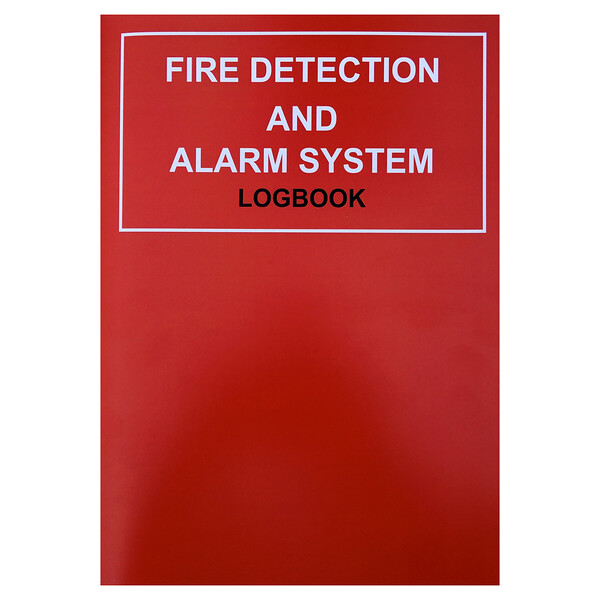
Huvo’s Docs-Store fire detection and alarm system logbook, SKU DOCFLB17, is listed for recording panel and zone details, detectors and alarms, and fire alarm testing. It is a paper record for the alarm system, rather than a digital task-management service.
Check the edition when ordering: Docs-Store’s current manufacturer page describes a different product, DOCLBF25, updated to BS 5839-1:2025. Huvo’s listing uses DOCFLB17, so confirm the supplied edition if you need the 2025 version or a book covering additional systems.
When we originally published this guide in August 2024, Paul Elcock of The Docs Store explained the role of the guidance inside its books:
“For the responsible person of the building, there is guidance in our logbooks providing technical reasons why they need to carry out these ongoing tests may not be known to them, therefore we provide some relevant information throughout each book explaining the reason why they have to complete certain necessary sections.”
Digital logbooks
A dedicated digital logbook can bring task reminders, named entries, reports and supporting documents together. Check the actual features and limits of the plan you choose. Online storage does not automatically guarantee accurate records, uninterrupted access or protection against every loss.
Before adopting a system, ask who owns the records, how you export them, what happens if the subscription ends, how permissions are controlled, and what you can access during an internet or service outage. Test these arrangements with a sample building before moving every site.
Tio Fire Safety: current free and paid plans
Tio’s digital logbook advertises guided tasks, automated reminders, time-stamped logs, audit trails and reports. It covers fire, security, electrical, gas and water records. These are the supplier’s published features, rather than a claim that software can fulfil the Responsible Person’s duties for them.
Published offer checked 6 November 2026: the Tio pricing page lists the following plans. All plans include unlimited users; the free plan is not an unlimited long-term record store.
| Tio plan | Published price | Selected limits |
|---|---|---|
| Free | £0 | 1 building; 1 custom task; 50 logbook entries; 50 assets; 50 visitors; 0 GB storage. |
| Core | £4.99 per building/month or £49.99 per building/year, plus VAT | 3 custom tasks; unlimited entries and visitors; 250 assets; 1 GB storage. |
| Pro | £9.99 per building/month or £99.99 per building/year, plus VAT | 15 custom tasks; unlimited entries and visitors; 500 assets; 5 GB storage. |
| Enterprise | Contact Tio for pricing | Multiple properties, large portfolios and custom requirements: confirm the agreed scope. |
Prices and terms can change. Check the supplier’s current details before choosing a plan, especially attachment storage, entry limits and the number of buildings you need.
Tio also has a contractor and partner offer describing digital service-visit records, document uploads, reports and job-management integrations by enquiry. Partner arrangements may differ from the public building plans: confirm pricing, limits and eligibility directly.
Moving from paper or spreadsheets to a digital logbook
- Inventory what you have. Identify every site, system, book, spreadsheet, certificate and unresolved action. Decide which record is authoritative.
- Check the software fit. Trial task schedules, permissions, reports, storage and export with your own sample records. Confirm costs at your expected entry and building volumes.
- Carry history forward. Keep original books and certificates safely. Scan or attach records where supported, with dates and site references; do not discard history merely because a new account exists.
- Set responsibilities. Name the record owner, routine testers, reviewers and contractors. Agree how faults become assigned actions and how completion is evidenced.
- Choose a changeover date. Train users and state where new entries belong. If keeping paper and digital records together, define which is the master and how copies are reconciled.
- Check the first cycle. Review completed and missed tasks, unresolved defects, access and a sample export. Correct gaps before extending the process to other buildings.
For fire alarm service companies: a customer’s building logbook and your engineers’ job sheets serve related purposes. Confirm whether your chosen tools also handle scheduling, quotations, certificates, invoicing and customer handover. A logbook app should not be assumed to replace a complete field-service platform; check the integration and report workflow first.
Fire logbook FAQs
Do fire logbooks have to be digital now?
No general switch to digital is established by the guidance cited here. Paper and electronic records can support the process. The practical requirements are to record the relevant information accurately, keep it available and maintain the fire precautions themselves.
Is there a free electronic fire logbook?
Yes. For example, Tio currently publishes a £0 plan, but it is limited to one building and 50 logbook entries, with 0 GB storage. Check how those limits fit your ongoing testing and document needs; “free” does not necessarily mean unlimited records or attachments.
Can a spreadsheet replace a paper fire logbook?
A structured spreadsheet can form part of your records, but you must manage access, version history, backups, attachments and follow-up actions. Decide how reviewers will identify the latest record and see who made or corrected an entry. Dedicated software may automate some of that administration.
How do you prove weekly fire alarm tests without a paper book?
Keep a retrievable record of each test identifying the date, tester, call point or device, result and any fault or action. Use named entries and an audit trail where available, with linked servicing evidence. A digital tick alone does not demonstrate that a test was properly performed.
Will an insurer accept a digital fire logbook?
Check the insurer’s policy conditions and ask what evidence and format it requires. Being able to export dated test records, servicing reports and completed remedial actions is useful, but no software subscription guarantees an insurer’s acceptance or a successful claim.
Does a logbook replace the fire risk assessment or servicing?
No. It organises evidence and helps track work. You still need the assessment, appropriate checks, competent servicing and corrective action required for the building.
Choosing a record system you will keep up to date
Start with the building’s needs and the people who will use the records. Paper, digital or a carefully managed combination can help. Choose clear responsibilities, accessible evidence and reliable follow-up over a format that looks impressive but leaves faults unresolved.
Sources reviewed: GOV.UK risk assessment, equipment and building-specific fire-door guidance; County Durham and Darlington Fire and Rescue Service’s recording guidance; Docs-Store’s current 2025 logbook page; and Tio’s logbook, pricing and contractor pages linked above.